v0.5.4 已发布 · 开源 · MIT 许可v0.5.4 is out · Open source · MIT

会动手,
也会先问你。
It does the work.
It asks you first.

Nyra 是跑在你电脑上的开源 AI agent。
读项目、改代码、跑命令、联网查证,每一步写入和执行都先等你点头。
Nyra is an open-source AI agent that runs on your computer. It reads your project, edits code, runs commands and checks the web, and waits for your OK before every write and every command.

curl -fL -o nyra https://github.com/js2005happy/nyra/releases/latest/download/nyra-macos-arm64 && chmod +x nyra && ./nyra setup

Apple 芯片。Intel Mac 把文件名换成 nyra-macos-x64。For Apple silicon. On an Intel Mac, use nyra-macos-x64.

Nyra desktop: an edit waits for approval, with the diff on the right
截图来自下个版本的桌面界面:改动停在右侧,等你批准。数据为示例。Screenshot of the desktop interface in the next release: the edit waits on the right for your approval. Sample data.

01界面Interface

一个 Nyra,三块屏幕One Nyra, three screens

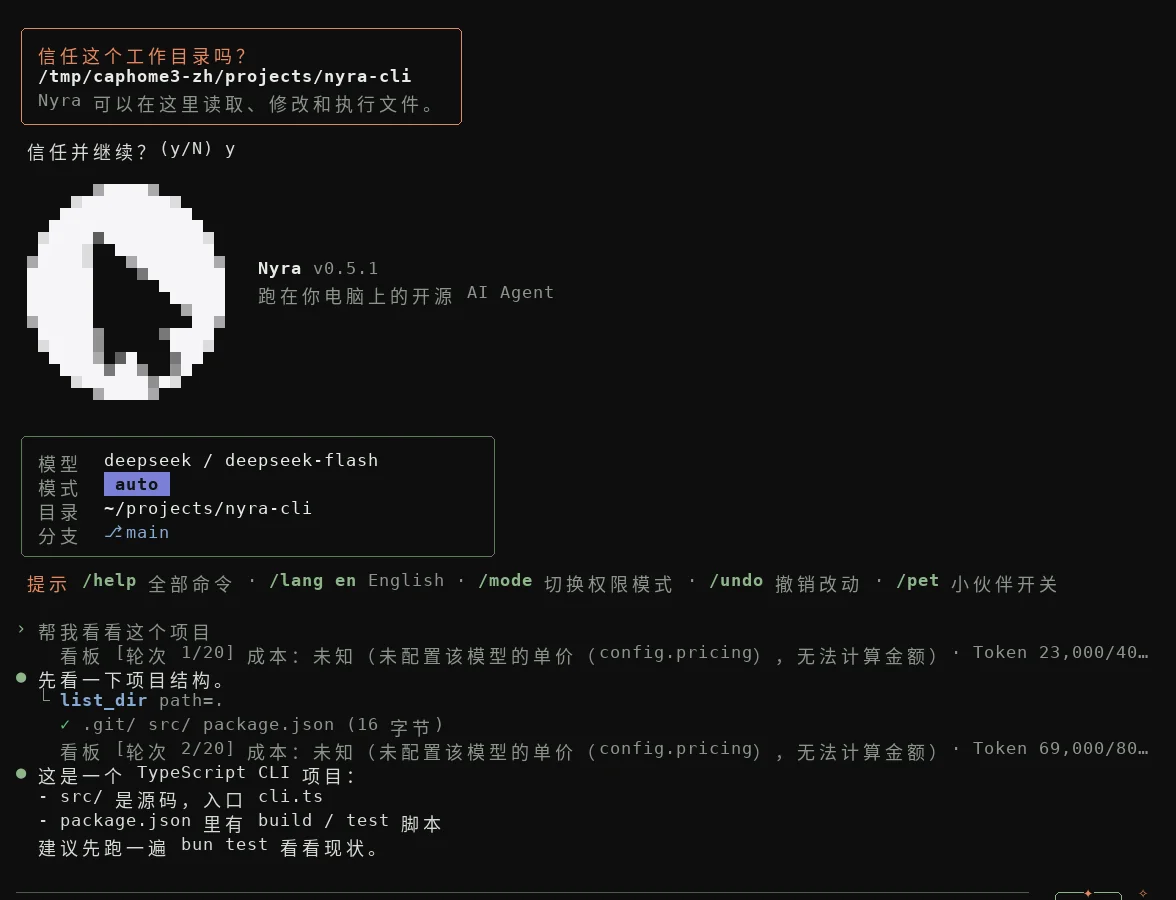
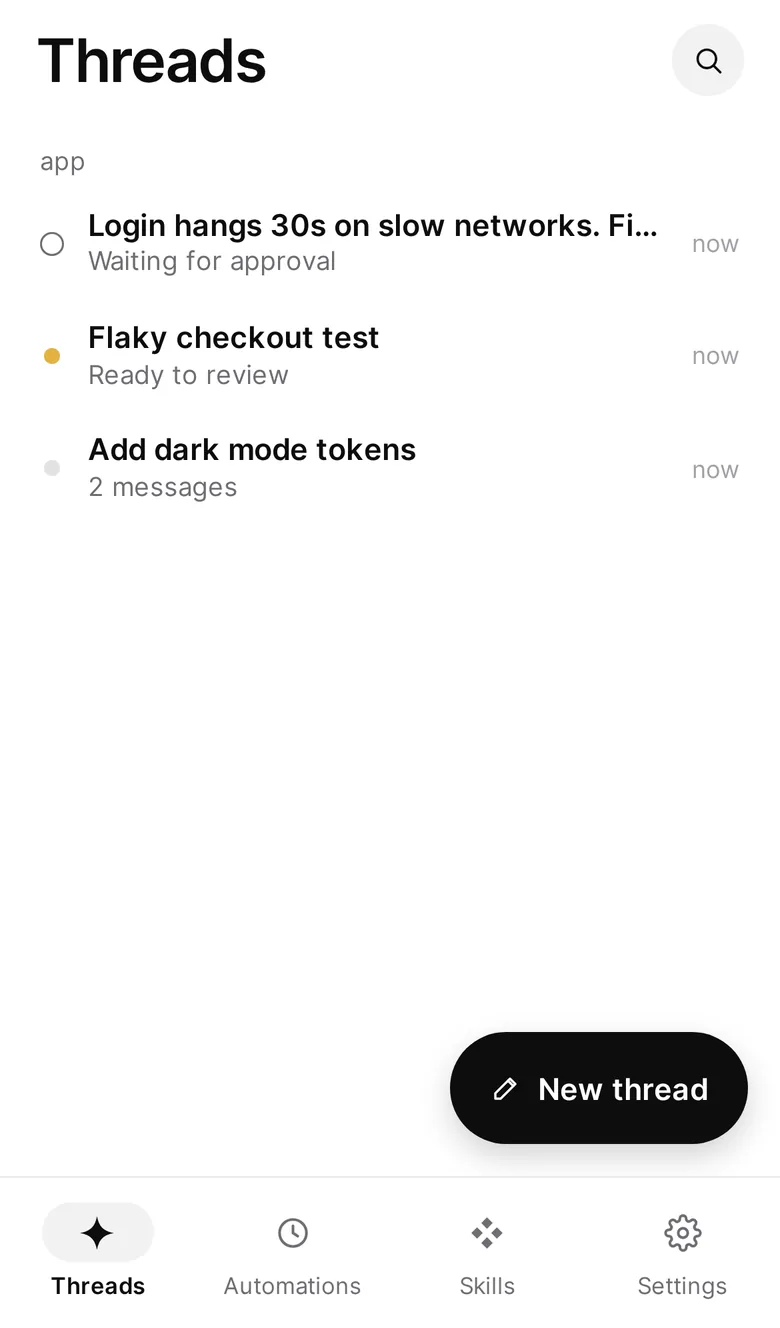
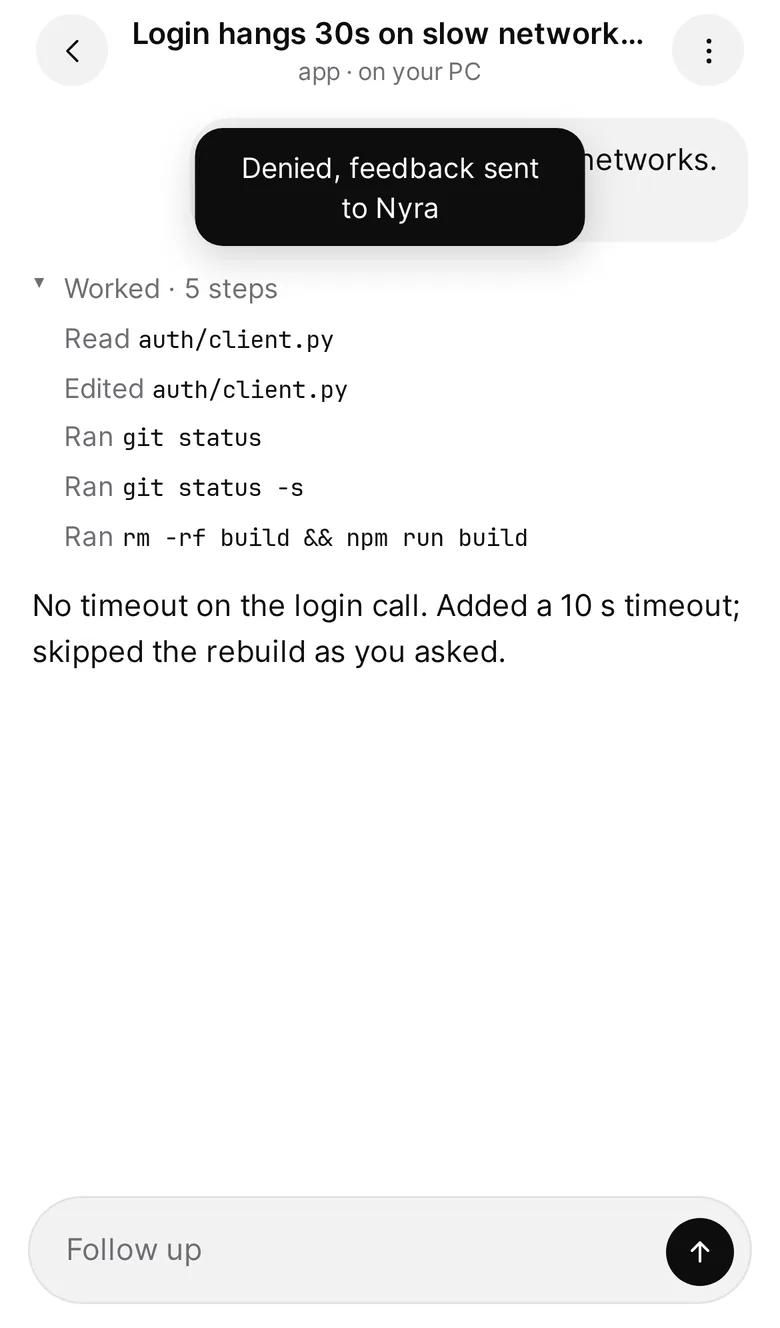
终端、桌面、手机共用同一套会话和审批。以下截图来自下个版本的界面,v0.5.1 的界面更简单;数据为示例。Terminal, desktop and phone share the same threads and approvals. These screenshots show the next release; v0.5.1 looks simpler. Sample data.

Nyra desktop: a finished thread with steps, the diff and the review panel
桌面Desktopnyra ui --open
Nyra in the terminal: trust prompt, welcome screen and a first task
终端Terminalnyra
Nyra on iPhone: thread list
Nyra on iPhone: a thread with its steps
手机Phonenyra ui --pair

02功能Features

能干活,也守规矩Does real work. Stays on a leash.

卡片里的截图来自下个版本的界面,数据为示例;标了“下个版本”的功能还不在 v0.5.1 里。Card screenshots show the next release, with sample data; features marked Next release aren’t in v0.5.1 yet.

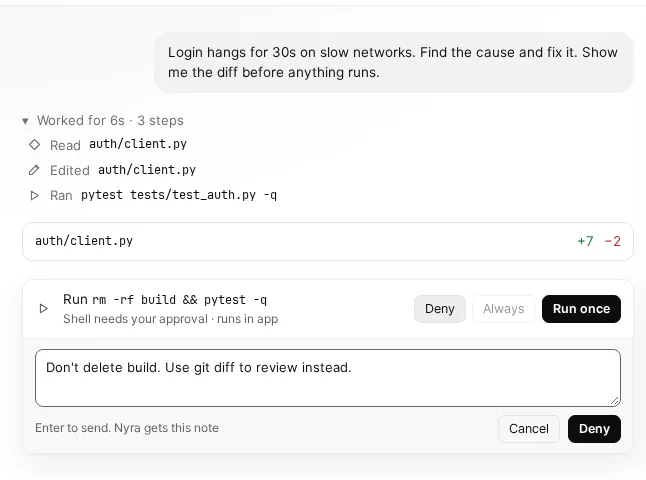
Next release: denying a command with a note

先问你,再动手Asks first, then acts

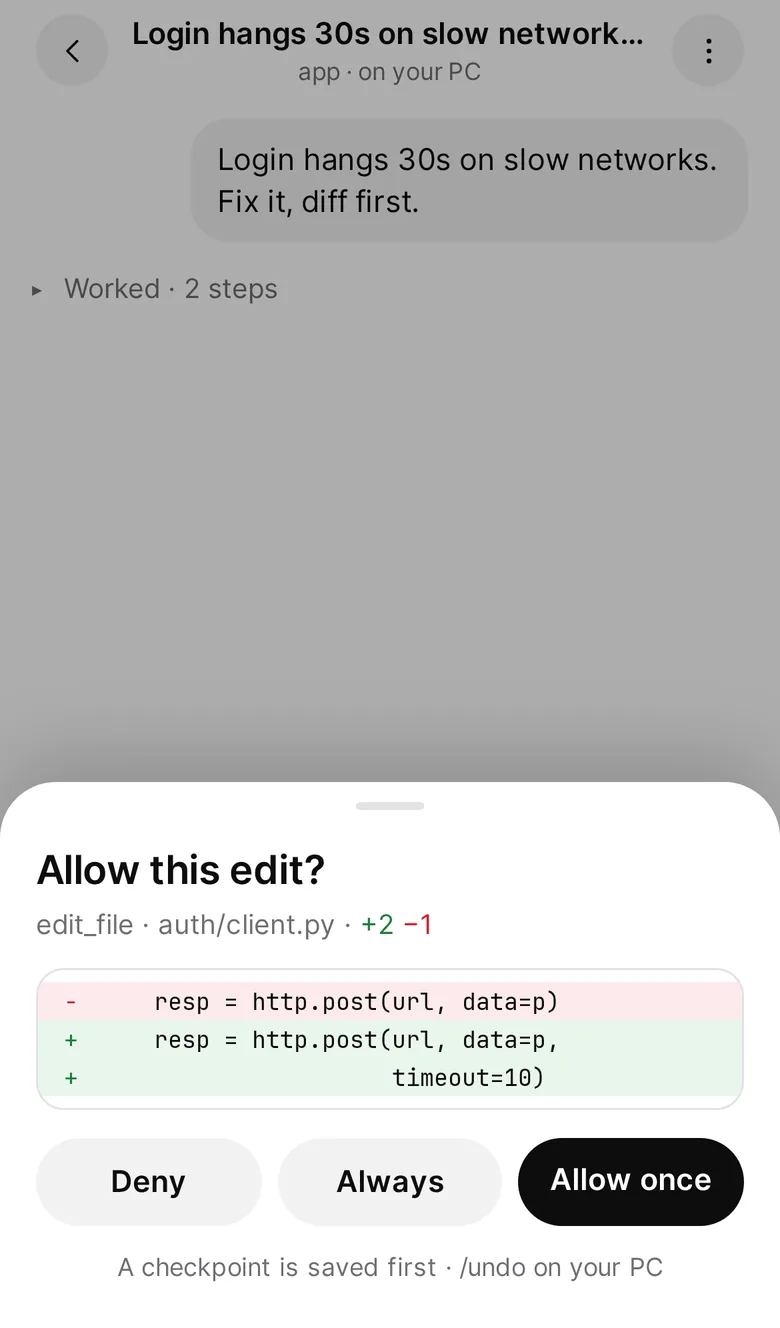
写文件、跑命令之前,先把 diff 或命令原文摆在你面前,你点头才执行。拒绝时附一句理由、让它换个做法,下个版本上线。Before any write or command, you see the diff or the exact command, and nothing runs until you say yes. Denying with a note so it changes course is coming in the next release.

  • 允许一次Allow once
  • 本会话始终允许Always, this session
  • 拒绝Deny

离开电脑,也能批准Approve from your phone

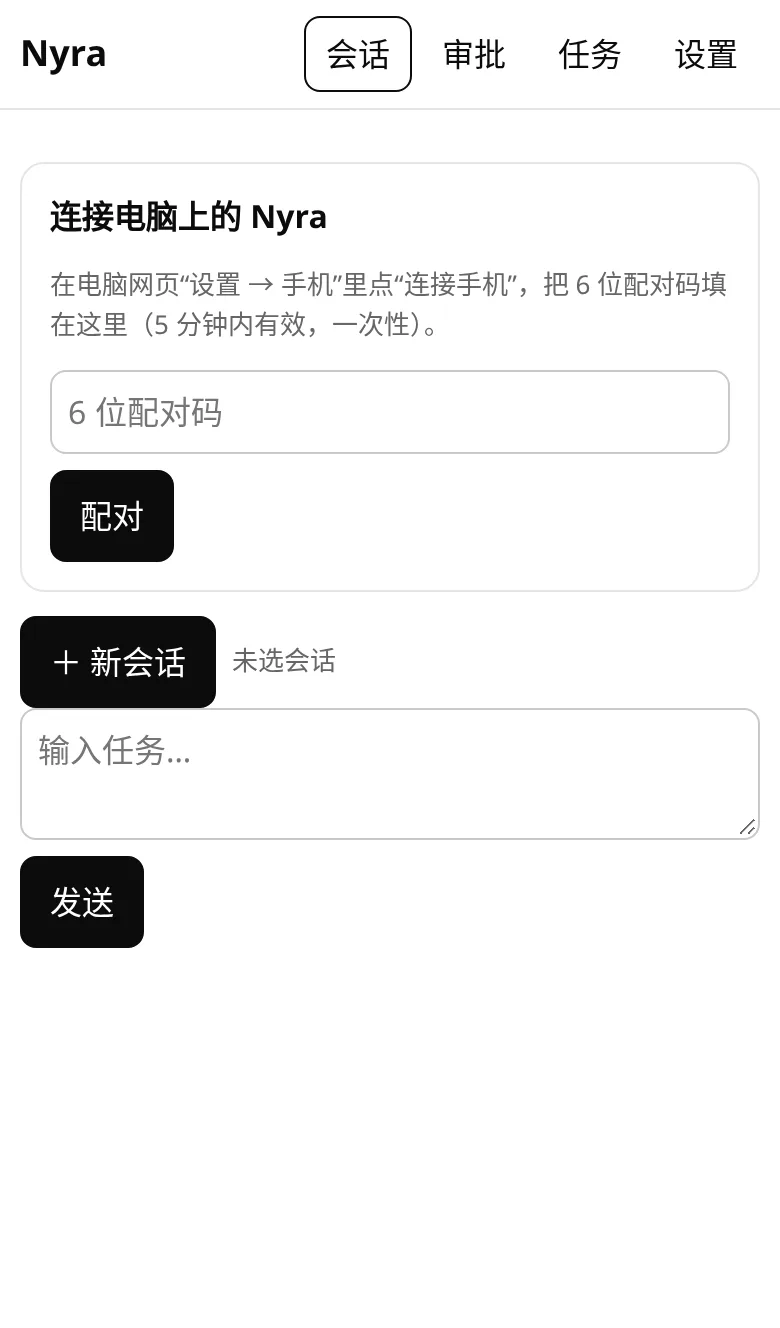
配对一次(打开终端给出的地址,输入配对码),审批就会出现在手机上。工具始终在你的电脑上执行。Pair once (open the address the terminal prints and enter the code) and approvals reach your phone. Tools still run on your computer.

nyra ui --pair
Approval sheet on iPhone: Allow this edit? with Deny, Always and Allow once
Nyra terminal session
下个版本Next release

终端里,中英文都地道Fluent in Chinese and English

下个版本上线:跟随系统语言,用 /lang、--lang 或 NYRA_LANG 随时切换,提示、帮助和审批一起变。v0.5.1 的终端界面是中文。Coming in the next release: follows your system language, and /lang, --lang or NYRA_LANG switch it any time; tips, help and approvals follow. In v0.5.1 the terminal is in Chinese.

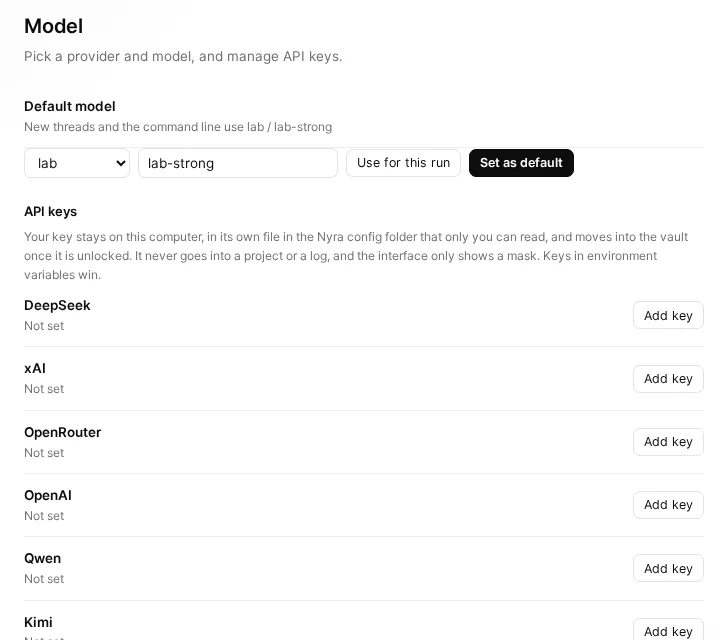
Settings, Model: API keys stay on this computer and only a mask is shown

数据在本机,Key 不出门Your data and keys stay home

会话和设置留在 ~/.nyra。Key 存进只有你能读的文件或加密密码箱,界面只显示掩码。Threads and settings stay in ~/.nyra. Keys go into a file only you can read, or the encrypted vault; the app only shows a mask.

定时任务、技能和 MCPAutomations, skills and MCP

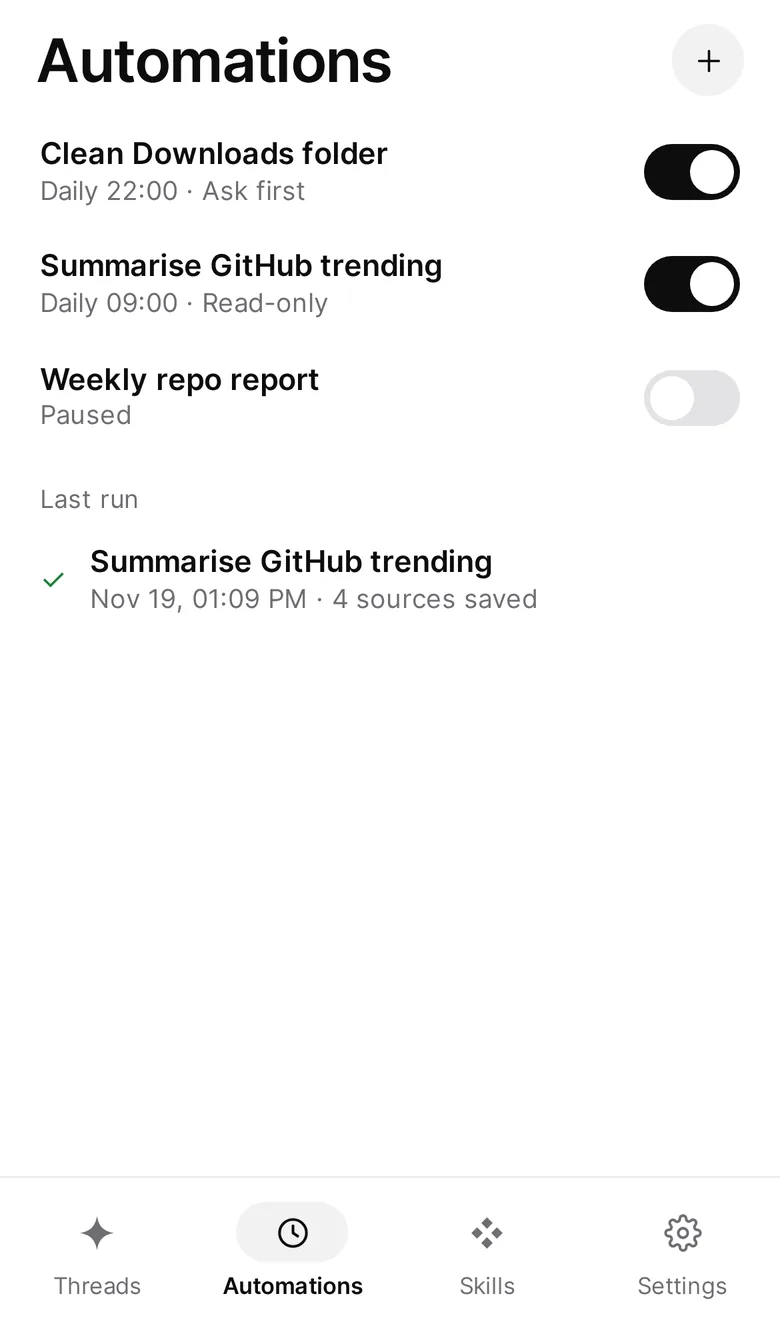
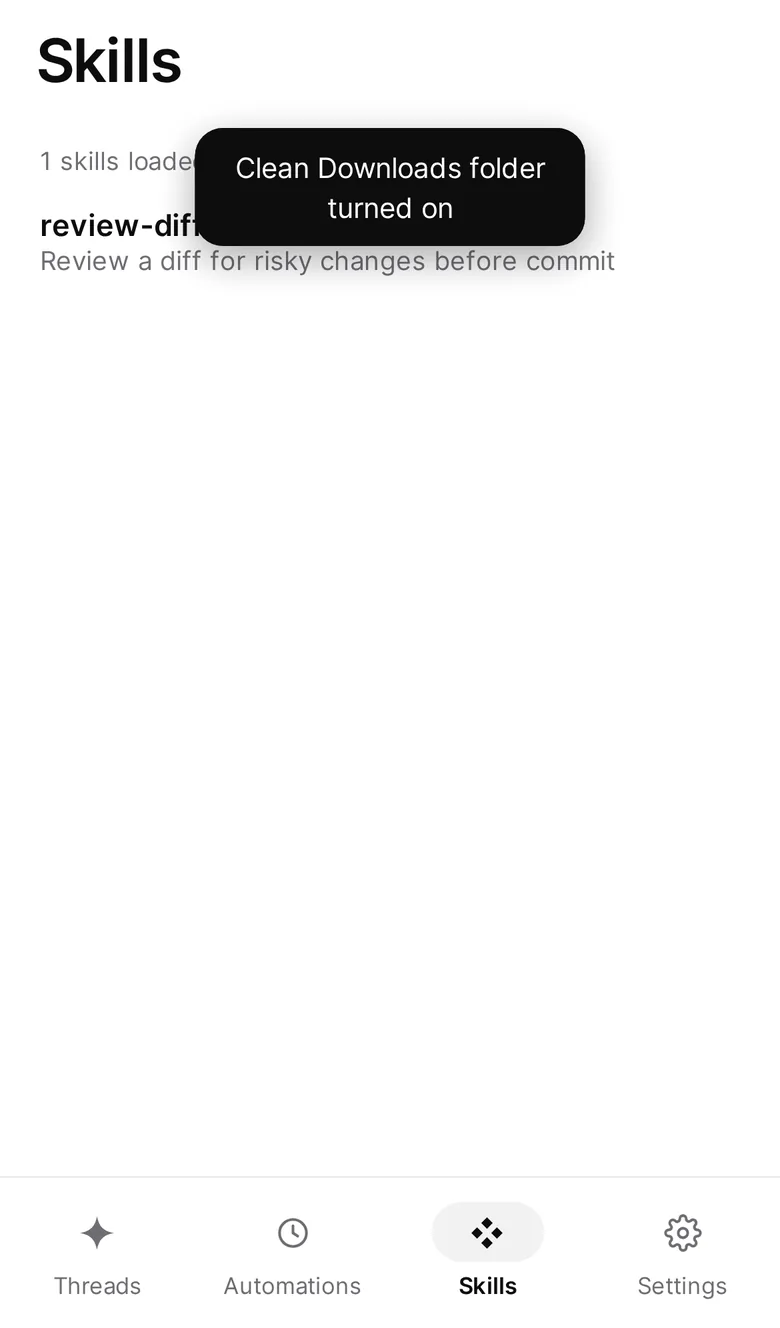
按时干活,照你的做法干活,接上你已经在用的工具。内置 10 个常用 MCP 预置;需要审批的操作照样停下来等你。Runs on a schedule, follows your playbooks, and plugs into your tools, with 10 common MCP servers preconfigured. Anything that needs approval still waits for you.

nyra schedule addnyra --list-skills
Automations on iPhone: daily tasks with on/off switches
Skills on iPhone: a loaded skill for reviewing diffs
  • memory
  • sequential-thinking
  • fetch
  • time
  • github
  • brave-search
  • filesystem
  • git
  • sqlite
  • puppeteer

03本地优先Local first

数据在本机,
Key 不出门
Your data stays home.
So do your keys.

交出控制权之前,先看清:东西放在哪,它能做什么,不能做什么。Before you hand over control, see where things live, and what it can and can’t do.

~/.nyra

数据在本机Data stays local

会话、运行记录和设置都在你电脑的 ~/.nyra 目录里,macOS 和 Linux 上目录权限 0700。Threads, run records and settings live in ~/.nyra on your computer, with folder mode 0700 on macOS and Linux.

keys.json · 0600

Key 落盘有权限Keys stored with tight permissions

在界面里填的 Key:密码箱已解锁就存进密码箱,否则写进 keys.json,macOS 和 Linux 上文件权限 0600。环境变量里的 Key 永远优先。A key you enter in the app goes into the vault when it’s unlocked, otherwise into keys.json, mode 0600 on macOS and Linux. A key in an environment variable always wins.

nyra vault

密码箱Encrypted vault

主密码经 PBKDF2-HMAC-SHA256 60 万次派生,每条记录单独加密并校验完整性。Your master password is stretched with PBKDF2-HMAC-SHA256 at 600,000 iterations; every entry is encrypted and authenticated.

sk-…abcd

明文不回传Never sent back in plain text

页面和接口只返回掩码,比如 sk-…abcd。Key 的明文不会再出现在界面上。The app and its API only ever return a mask like sk-…abcd. The plain key never comes back to the screen.

/undo

能撤销Undo

每次写入前自动存检查点,/undo、/rewind 退回。shell 和网络这类外部副作用撤销不了,这点我们不含糊。A checkpoint is saved before every write; /undo and /rewind take you back. Side effects outside your files, like shell or network calls, can’t be undone.

--sandbox auto

命令进沙箱Sandboxed commands

Linux 上用 bwrap。macOS(seatbelt)和 Windows(Job Object)的沙箱在下个版本上线。条件不满足时会明说,不会悄悄裸跑。bwrap on Linux; sandboxes for macOS (seatbelt) and Windows (Job Objects) are coming in the next release. When a sandbox isn’t available, Nyra tells you instead of quietly running without it.

v0.5.1 里,“始终允许”只对同一个文件或同一条命令生效,只管本次会话。按命令前缀记规则、可在 设置 → 权限与审批 里撤销,以及删除、提权、联网和复合命令只能单次允许,这些在下个版本上线。In v0.5.1, “Always” covers only the same file or the exact same command, for this session only. Prefix rules you can revoke under Settings → Permissions & approvals, with deletes, sudo, network and compound commands limited to allow-once, are coming in the next release.

04未来计划Roadmap

下一步:
和朋友的 agent 一起干活
Next: work alongside
a friend’s agent

这里只列仓库里已经立项的方向,状态如实标注,不承诺日期。Only plans already filed in the repository, with honest status labels and no promised dates.

设计中In design

Agent 加好友,一起协作Agent friends, working together

加好友,加的是一个人和他的 agent。视频通话时,两边的 agent 一起在场,共用同一个线程、计划和 diff。A friend is a person plus their agent. On a video call, both agents join in and share one thread, one plan and one diff.

  • 对方的 agent 想改你的文件,照样弹出你的审批卡:拒绝、总是允许、允许一次。When their agent wants to edit your files, you get your own approval card: deny, always, or allow once.
  • 对方的 agent 默认只读;它在你这里能做什么,由你逐项决定。Their agent is read-only by default. You decide, item by item, what it may do on your machine.
  • 谁的 agent 干活,花谁的 token。视频和语音只走流量,不耗 token。Each agent spends its owner’s tokens. Video and voice use bandwidth, not tokens.
  • 录制必须全员同意才开始。Recording starts only when everyone agrees.
看设计说明Read the design spec
Design mockup of a Nyra video call: two people, both agents, and a shared panel where the friend's agent asks to edit your file
Design mockup of the call on a phone, with both agents and one pending approval
设计稿,尚未上线。画面里的人物视频是示意图,数字均为示例。Design mockups, not shipped. The people on video are illustrative, and all numbers are samples.
计划中Planned

通过商店的 agent 购物Shop through a store’s agent

用 UCP 协议和商店的 agent 对话、下单。任何交易之前,都要你亲自批准。Talk to a store’s agent over the UCP protocol. Nothing is bought until you approve it yourself.

UCP
计划中Planned

签名的安装包Signed installers

Windows 和 macOS 安装包的签名流程已经接好,等证书到位,首次打开就不再弹警告。Code signing for the Windows and macOS installers is wired up. Once the certificates are in, the first-launch warning goes away.

Windows · macOS
已上线Shipped

手机上审批Approvals on your phone

运行 nyra ui --pair,手机打开终端给出的地址、输入配对码,审批就会出现在手机上。扫码配对在下个版本上线。Run nyra ui --pair, open the address it prints on your phone and enter the code; approvals show up there. Pairing by QR code is coming in the next release.

nyra ui --pair

05下载Download

下载 NyraDownload Nyra

最新版 v0.5.4,2026 年 11 月 22 日发布。已经按你的设备选好,也可以切换。Latest release v0.5.4, published November 22, 2026. We picked your device; switch any time.

桌面端Desktop app

安装包自带同版本的命令行版,装好就能用,不用另外装。The installer includes the matching command-line app, so there’s nothing else to install.

只要命令行版:Command-line app only: nyra-windows-x64.exe · v0.5.4 · 114 MB

安装包和 exe 目前未签名。第一次打开时如果 SmartScreen 提示“Windows 已保护你的电脑”,点“更多信息”,再点“仍要运行”。The installers and the exe aren’t signed yet. If SmartScreen says “Windows protected your PC” the first time, choose More info, then Run anyway.

终端Terminal

  1. 在 PowerShell 里安装Install from PowerShell

    irm https://raw.githubusercontent.com/js2005happy/nyra/main/scripts/install-node.ps1 | iex

    装到 ~\nyra,加进 PATH,桌面上会多两个快捷方式。Installs to ~\nyra, adds it to PATH and creates two desktop shortcuts.

  2. 打开新的 PowerShell 窗口,运行首次设置Open a new PowerShell window and run setup

    nyra setup

更新Update

再运行一次第 1 步的命令,会换成最新版。Run the step 1 command again; it installs the latest release.

卸载Uninstall

& ([scriptblock]::Create((irm https://raw.githubusercontent.com/js2005happy/nyra/main/scripts/install-node.ps1))) -Uninstall

删掉安装目录、快捷方式和 PATH 里的那一项;~\.nyra 里的数据会保留。Removes the install folder, the shortcuts and the PATH entry; your data in ~\.nyra is kept.

全部文件与更新说明:All files and release notes: v0.5.4 发布页the v0.5.4 release page

MIT 许可,
代码全部公开
MIT licensed.
Every line is public.

读代码、提 issue、发 PR 都欢迎。手册、设计说明和路线图也都在仓库里。Read the code, open an issue, send a pull request. The guide, design notes and roadmap are all in the repository.

06问答Questions

常见问题Questions, answered

更多问题在完整列表里。找不到答案,就到 GitHub Issues 问。There’s more in the full list. Can’t find an answer? Ask on GitHub Issues.

查看全部问题See all questions
Nyra 收费吗?Does Nyra cost anything?

Nyra 本身免费、开源,以 MIT 许可发布。调用模型产生的费用在你和模型服务商之间结算;也可以用本机的 Ollama 模型,或复用本机的 Codex 登录。Nyra itself is free and open source under the MIT License. Model usage is billed between you and your model provider; you can also use a local Ollama model or reuse the Codex sign-in on your machine.

支持哪些模型?Which models does it support?

DeepSeek(默认)、xAI Grok、OpenAI、通义千问、Kimi、智谱、Gemini、OpenRouter、Mistral、Groq、Together、本机 Ollama、本机 Codex 登录,以及任何兼容 OpenAI 接口的自定义服务。运行 nyra --list-providers 查看全部。DeepSeek (the default), xAI Grok, OpenAI, Qwen, Kimi, Zhipu GLM, Gemini, OpenRouter, Mistral, Groq, Together, a local Ollama, the Codex sign-in on your machine, and any custom OpenAI-compatible endpoint. Run nyra --list-providers to see them all.

我的 Key 存在哪里?Where are my keys stored?

环境变量里的 Key 永远优先。在 Nyra 界面里填的 Key,密码箱已解锁时存进本机加密密码箱,否则写进 ~/.nyra/keys.json(macOS 和 Linux 上文件权限 0600)。页面和接口只显示掩码,比如 sk-…abcd,明文不会回传。A key in an environment variable always wins. A key you enter in the Nyra app goes into the encrypted local vault when it’s unlocked, otherwise into ~/.nyra/keys.json (mode 0600 on macOS and Linux). The app and its API only show a mask like sk-…abcd; the plain key is never sent back.

它会不会乱改我的文件?Will it mess with my files?

默认的 auto 模式下,写文件和跑命令前都会先问你。文件工具写不出当前工作目录,.git、.nyra 和 AGENTS.md 这类路径默认拒写。每次写入前都会存检查点,改错了可以 /undo。In the default auto mode it asks before writing a file or running a command. File tools can’t write outside your working folder, and paths like .git, .nyra and AGENTS.md are off limits by default. A checkpoint is saved before every write, so /undo can take it back.

手机端要装 App 吗?Do I need an app on my phone?

不用。在电脑上运行 nyra ui --pair,用手机浏览器打开终端给出的地址、输入配对码,再添加到主屏幕就行(扫码配对在下个版本上线)。手机和电脑需要在同一个 Wi‑Fi 下,工具始终在电脑上执行。手机端目前只在模拟器里验证过,真机反馈很欢迎。No. Run nyra ui --pair on your computer, open the address it prints in your phone’s browser, enter the code, and add it to your home screen (pairing by QR code is coming in the next release). Your phone and computer need to be on the same Wi‑Fi, and tools always run on the computer. The phone app has only been tested in emulation so far; reports from real devices are welcome.

为什么系统提示安装包不安全?Why does my system warn me about the installer?

Windows 和 macOS 的安装包目前还没有签名和公证。Windows 上点“更多信息 → 仍要运行”;macOS 上在访达里右键 → 打开,放行一次即可。各平台的安装文档里有详细步骤。The Windows and macOS packages aren’t signed or notarized yet. On Windows choose More info → Run anyway; on macOS right-click the file in Finder and choose Open, once. The install guides for each platform have the details.

把第一件事交给 NyraGive Nyra its first task

开源,在本机运行,每一步都由你决定。Open source, running on your machine, with every step your call.